Custom taskbar for Windows
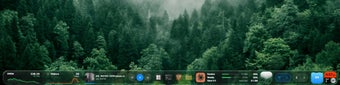
Lumabar is a premium personalization app for PC by a developer who goes by Kenzo Solo. It is a Windows utility that lets users replace their native taskbar with a live widget dock that offers enhanced functionality. It serves up glanceable information on their most-used applications, which they can check and interact with in real time.
A more capable and useful taskbar
The way Lumabar works is that it hides the native Windows taskbar and replaces it with a more capable, fully-featured live dock that can do more for you. There are more than 80 widgets, from productivity to media and system monitoring tools, catering to different types of users. You can customize it however you want and with as many items as your system can handle performance-wise.
While on the subject, all the added functionality and, well, eye candy it provides comes at a cost, and they are higher system resource usage and reduced performance headroom. One minor caveat is the lack of a trial or limited free version that would allow newcomers to test it out for themselves first before they decide to purchase and continue using it.
Really great, if your machine can handle it
To wrap up, Lumabar is a pretty cool app that not only enhances how you use and interact with your PC, but also does it with visual flair. It’s really a viable alternative to your taskbar that’s easy to set up, adaptable to your workflow, and offers information at a glance. Give it a try and see for yourself.